"How much does a render farm cost?" has an honest answer, and it is not a single number. The bill for a job comes from three things: how long one frame takes to render, how many frames there are, and what hardware renders them. Once you know those three, you can work out the cost of a job before you submit it.
This guide explains the pricing models render farms use in 2026, walks through a real calculation, and lists the ways to bring the cost down.
The three pricing models
GHz hours (CPU rendering). One processor core running at 1 GHz for one hour. A 32-core machine at 3.5 GHz uses 112 GHz hours every hour. Farms bill CPU work this way because it makes the price independent of which machine picks your job up.
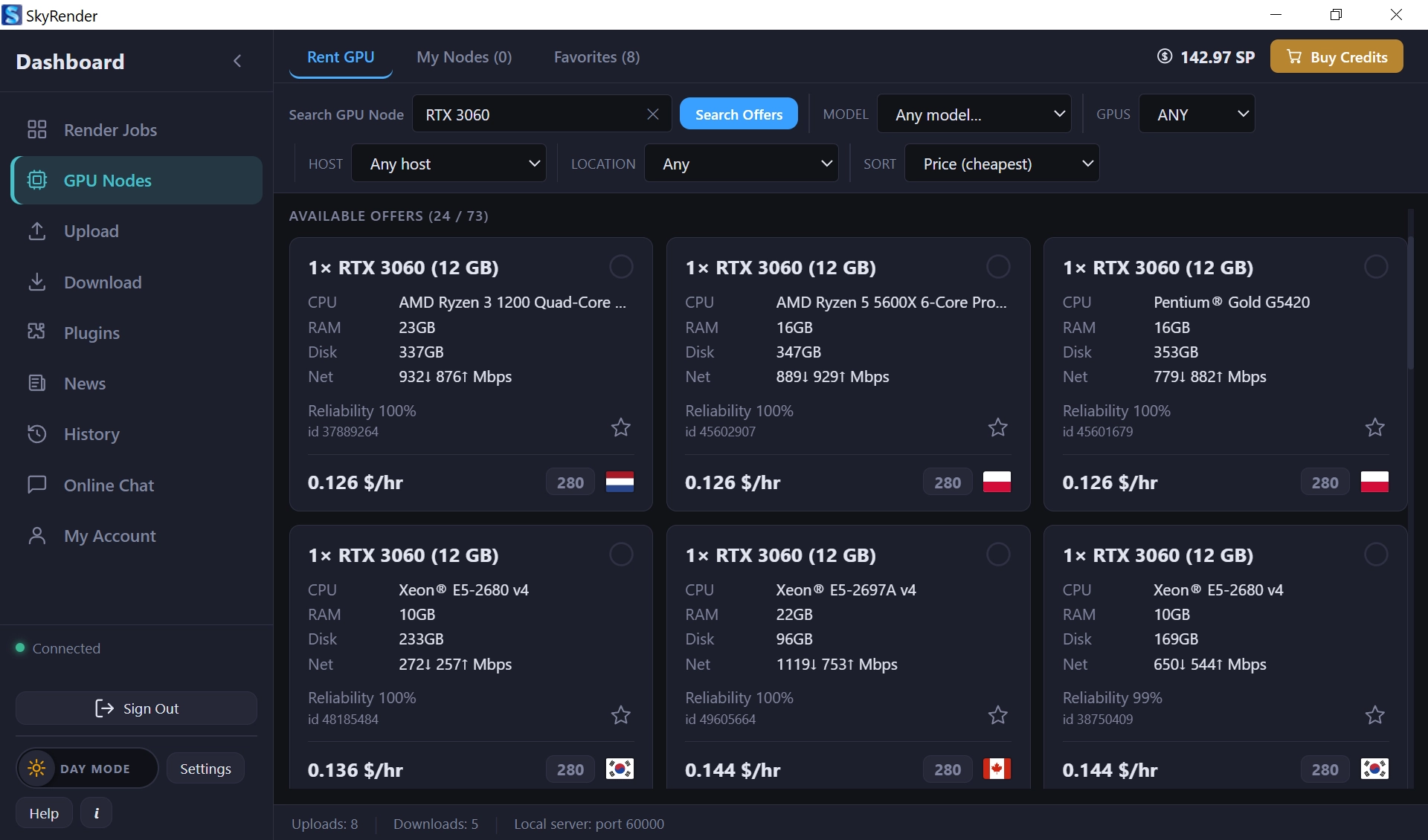
GPU or node hours (GPU rendering). The time a graphics card, or a whole machine, spends on your job. The rate depends on the card: an RTX 5090 costs more per hour than an RTX 3090, and usually renders faster.
Credits. Most farms sell prepaid credits and deduct them as you render. Credits are a wrapper around one of the two units above, so always check what one credit buys.
How Sky Render Farm prices rendering
Sky Render Farm uses credits called SkyPoints. One SkyPoint costs $1. There is no subscription, no membership and no monthly fee; you top up and render.
What the credits pay for depends on the application:
- Blender and Unreal Engine are rented by the node. You pick the graphics cards (RTX 3090, RTX 4090 or RTX 5090), rent as many as you want, and pay for the seconds they run. Each node shows an hourly rate, but that is only for comparison: there is no minimum rental and no rounding up to the hour.
- 3ds Max, Maya and Cinema 4D run as managed cloud rendering. The farm assigns the machines and bills the CPU and GPU hours your job uses.
Larger top-ups earn bonus credits rather than a discount. You are charged exactly what you top up, and the bonus is added on top:
| You pay | Bonus | SkyPoints credited |
|---|---|---|
| $100 | none | 100 |
| $250 | 2% | 255 |
| $500 | 3% | 515 |
| $1,000 | 4% | 1,040 |
| $2,500 | 5% | 2,625 |
| $5,000 | 6% | 5,300 |
| $10,000 | 7% | 10,700 |
| $50,000 | 10% | 55,000 |
The minimum top-up is $5. The pricing page always shows the current table.
A worked example: a Blender animation
Say you have a 200-frame Cycles animation that takes 3 minutes per frame on an RTX 5090.
- Total work: 200 frames × 3 minutes = 600 minutes = 10 GPU hours.
- A node listed at $0.648 per hour (a typical RTX 5090 rate at the time of writing) costs about $6.48 for that work.
Now the part that surprises people: renting more nodes costs almost the same. The animation is a fixed amount of work. On 2 nodes it takes about five hours; on 15 nodes it takes about 42 minutes. Because every node bills by the second, you pay for the work, not for how widely it is spread.
The only overhead is the last round. A frame cannot be split between machines, so 200 frames on 15 nodes runs 14 rounds, and in the final round 10 of the 15 nodes sit idle. That adds roughly 5%, bringing the example to around $6.80 and turning a five-hour wait into 42 minutes.
Node rates move with the market. At the time of writing we see RTX 3090 nodes around $0.24 per hour, RTX 4090 around $0.69 and RTX 5090 around $0.65. Every node shows its current rate, GPU, VRAM, CPU and network speed before you rent it.
What makes a render expensive
Render time per frame is the lever that matters most. The usual culprits:
- Samples. Doubling samples roughly doubles render time. Use adaptive sampling and a denoiser instead of brute force.
- Light bounces and caustics. Most scenes look identical with fewer bounces than the defaults.
- Volumetrics, fur and displacement. Beautiful, and expensive. Check whether the camera actually sees them.
- Resolution. 4K is four times the pixels of 1080p.
- Scenes that do not fit in VRAM. On GPU, an oversized scene can fail or fall back to slower paths. Optimise textures before rendering.
How to lower the cost
- Render test frames first. Send two or three representative frames (the heaviest ones) to measure the real time and cost before submitting the full sequence.
- Pick hardware per job. An overnight job with no deadline can run on cheaper cards; a morning deadline justifies RTX 5090 nodes.
- Optimise the scene once. A 20% faster frame is 20% off every frame of every revision.
- Top up in larger amounts if you render regularly, and take the bonus credits.
- Use the calculator. Enter your local render time per frame into the cost calculator for an estimate before you submit.
Free credits to find your real number
Estimates are useful; a measured test frame is better. New accounts receive free SkyPoints for test jobs. Download SkyRender Desktop, submit a few frames of your own scene, and you will know exactly what the full job costs before you spend anything.
For the basics of how farms work, see What is a render farm?.